See what your browser is sharing
Exposed is a free Chrome extension that shows you what personal data websites send to third parties — in plain English, in real time.
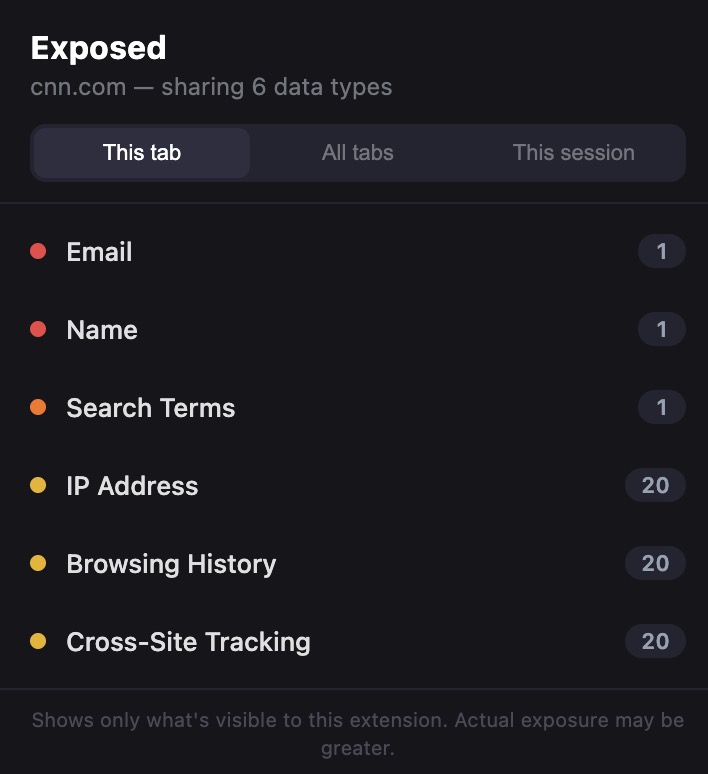
Browse any website
→
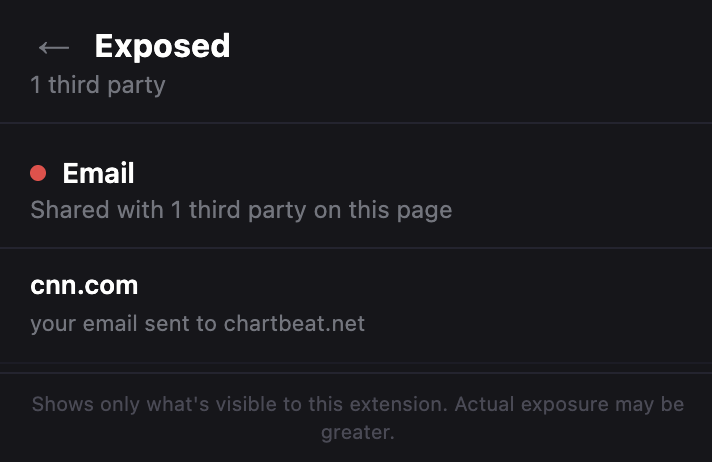
Click any category for details
What it detects
Every time a website sends your data to a third party, Exposed catches it.
Email
Your email address being sent to ad networks or trackers in the page URL.
Name
Your name passed to third parties through URL parameters.
Device ID
Sites reading your screen, graphics card, or audio hardware to identify your specific device.
Location
Your GPS location requested, or your location looked up through your IP address.
Search Terms
What you searched for being forwarded to third-party trackers.
IP Address
Your IP address shared with known tracking and advertising companies.
Browsing History
The page you're visiting being shared with third parties through the referer header.
Cross-Site Tracking
Tracking cookies that let companies follow you across different websites.
How it works
No setup, no accounts, no configuration.
1
Install it
Add Exposed to Chrome in one click. It starts working immediately.
2
Browse normally
The icon badge shows how many types of data the current page is sharing.
3
Click to see details
Open the popup to see exactly what's being shared and with who.
Built for trust
100% local. Exposed never sends your data anywhere. Everything stays on your computer.
Open source. Every line of code is public on GitHub. You can read exactly what it does.
Doesn't block anything. Exposed only watches and reports. It never changes how websites work.
No accounts, no tracking, no ads. Install it and forget about it until you want to check.